
10 CMMS Best Practices to Streamline Facility Maintenance in 2025
What is CMMS Software?
CMMS (Computerized Maintenance Management System) is software that centralizes maintenance operations, work orders, asset tracking, and preventive maintenance scheduling in one platform. Modern cloud-based CMMS solutions enable facility teams to eliminate paper-based processes, automate routine tasks, and shift from reactive to predictive maintenance strategies.
Unlike legacy facility management systems, today's CMMS platforms integrate with IoT sensors for real-time equipment monitoring, mobile apps for field technicians, and analytics dashboards for data-driven decision making.
Why CMMS Best Practices Matter in 2025
Unplanned downtime costs industrial facilities an estimated $50 billion annually, with the average manufacturer losing 800 hours per year to equipment failures. Yet over 70% of CMMS implementations fail to deliver expected ROI due to poor planning, inadequate training, and lack of organizational buy-in.
Following proven CMMS best practices helps facility teams:
- Reduce unplanned downtime by 32%
- Cut maintenance costs by 25%
- Extend asset lifespan by 20%
- Improve technician productivity by 28%
- Achieve 95%+ preventive maintenance compliance
10 CMMS Best Practices for 2025
1. Define Clear Implementation Objectives Before Selection
Start with specific, measurable goals rather than vague aspirations like "improve maintenance." Effective objectives might include reducing work order backlog by 40%, achieving 90% PM compliance within 6 months, or cutting emergency repair costs by 30%.
Document your current state metrics first: average response time, PM completion rate, mean time to repair (MTTR), and maintenance cost per square meter. These baselines let you measure actual improvement after implementation.
Implementation tip: Create a one-page business case that connects CMMS benefits to organizational KPIs your leadership cares about, whether that's operational uptime, safety incidents, or cost per unit produced.
2. Secure Executive Buy-In and Cross-Functional Support
CMMS implementations fail when they're treated as "just a maintenance tool." Successful deployments involve operations, finance, procurement, and IT stakeholders from the start.
Executive sponsorship provides budget protection, helps overcome departmental resistance, and ensures the CMMS integrates with existing enterprise systems. Without leadership support, adoption stalls and the system becomes expensive shelf-ware.
Implementation tip: Identify a champion in each department who will advocate for adoption and provide feedback during rollout. Their peer influence accelerates user adoption more effectively than top-down mandates.
3. Clean and Standardize Your Asset Data
Poor data quality is the silent killer of CMMS projects. Before migrating anything, audit your asset inventory: equipment names, locations, criticality ratings, maintenance histories, and spare parts associations.
Standardize naming conventions (no more "AHU-3," "Air Handler 3," and "AHU Unit Three" for the same equipment) and establish clear hierarchies showing parent-child relationships between systems and components.
Data migration checklist:
- Create unique asset IDs with consistent naming conventions
- Document manufacturer, model, serial number, and installation date
- Assign criticality ratings (1-5 scale based on operational impact)
- Map spare parts to specific equipment
- Import maintenance history for trend analysis

4. Choose CMMS Software Based on Must-Have Features
Not all CMMS platforms are equal. Match features to your actual workflow needs rather than impressive demo capabilities you'll never use. Understanding the difference between CMMS and facilities management software helps you select the right solution.
Selection tip: Prioritize platforms with strong mobile apps and intuitive interfaces. If technicians find the system clunky, they'll revert to paper and spreadsheets regardless of feature richness. Compare options using our facilities management software pricing guide.
5. Implement in Phases Over 30-90 Days
Big-bang implementations create big-bang failures. Successful CMMS rollouts follow a phased approach that builds confidence and allows for course correction.
Phase 1 (Week 1-2): Foundation
- Configure asset hierarchy and locations
- Import cleaned asset data
- Set up user roles and permissions
- Train core admin team
Phase 2 (Week 3-4): Work Orders
- Launch reactive work order management
- Establish request submission workflows
- Configure assignment rules and escalations
- Train requesters and technicians
Phase 3 (Week 5-8): Preventive Maintenance
- Build PM schedules for critical assets
- Create standardized task checklists
- Set up automated scheduling triggers
- Train on PM workflow execution
Phase 4 (Week 9-12): Optimization
- Add inventory management
- Implement IoT sensor integrations
- Build analytics dashboards
- Refine workflows based on user feedback
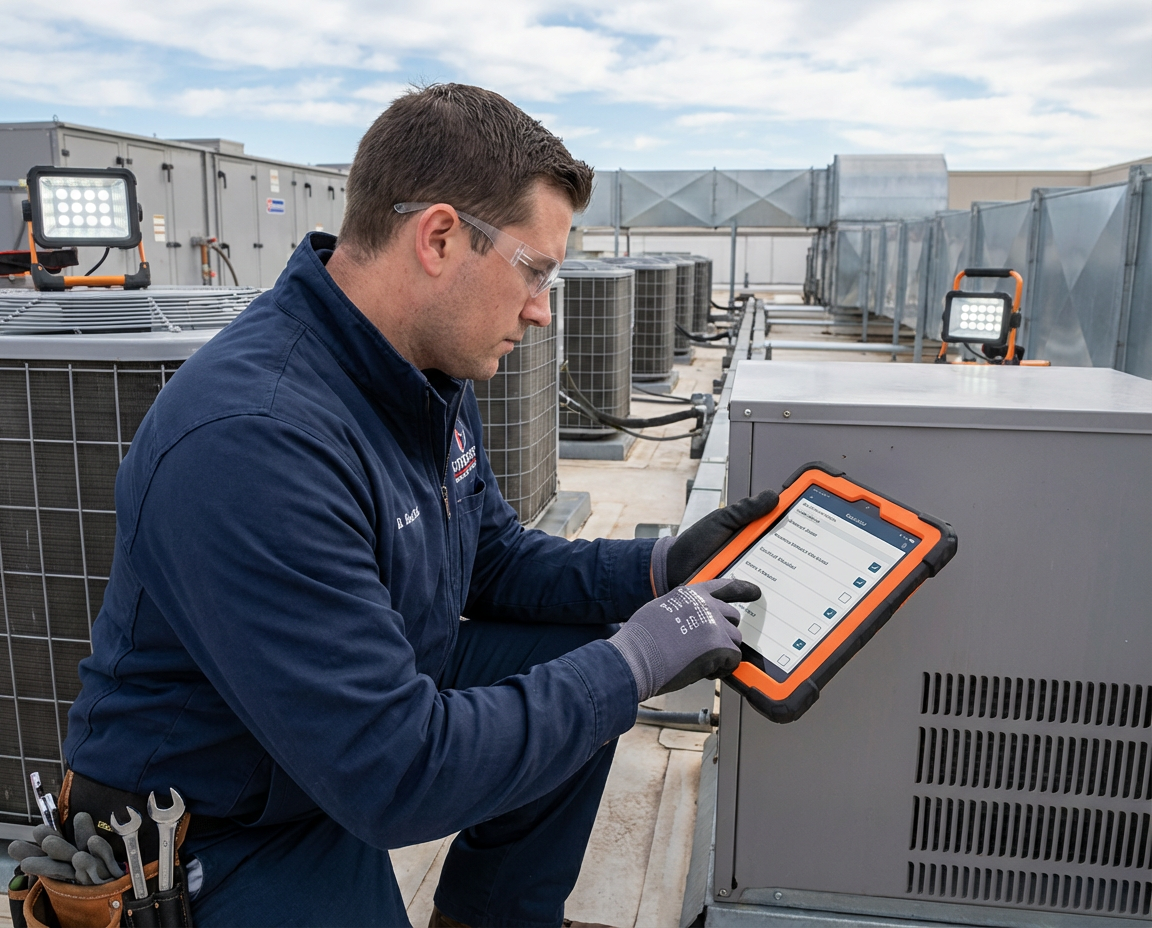
6. Prioritize Mobile Access for Field Technicians
Technicians spend 25-40% of their time on administrative tasks when using paper-based systems. Mobile CMMS apps let them receive assignments, access equipment history, log work, and close tickets from anywhere.
Key mobile capabilities to require:
- Offline mode for areas with poor connectivity
- Barcode/QR scanning for asset lookup
- Photo and video capture for documentation
- Voice-to-text for faster notes
- Digital signatures for compliance
Adoption tip: Issue dedicated tablets or rugged smartphones rather than expecting technicians to use personal devices. Company-provided devices drive higher adoption and better data capture.
7. Invest in Comprehensive User Training
Training isn't a one-time event during go-live. Plan for initial training, refresher sessions at 30 and 90 days, and ongoing support for new hires.
Structure training by role:
- Requesters: How to submit and track work requests (1 hour)
- Technicians: Mobile app workflow, work order execution, time tracking (4 hours)
- Supervisors: Assignment, scheduling, and performance monitoring (4 hours)
- Admins: Configuration, reporting, and troubleshooting (8 hours)
Training tip: Create short video tutorials (2-3 minutes each) for common tasks. Technicians prefer quick reference videos over lengthy manuals when they're stuck in the field.
8. Start with Preventive Maintenance Workflows
Reactive maintenance costs 3-5x more than preventive maintenance. Yet many facilities run 70%+ reactive because PM programs lack discipline. Modern preventive maintenance scheduling systems automate this process. Learn more about bridging the gap between preventive and predictive maintenance.
Use your CMMS to enforce PM compliance:
- Auto-generate PM work orders based on time or meter readings
- Create mandatory checklists that can't be bypassed
- Set escalation rules for overdue PMs
- Track compliance rates and publish weekly scorecards
Focus initial PM programs on critical assets where failure causes safety risks, production stops, or regulatory issues. Expand coverage as the team builds PM execution discipline.
9. Track KPIs from Day One
You can't improve what you don't measure. Configure your CMMS dashboard to display key performance indicators from the first week of operation.
Essential maintenance KPIs:
- MTTR (Mean Time to Repair): Average hours from work order creation to completion
- MTBF (Mean Time Between Failures): Average operating hours between equipment failures
- PM Compliance Rate: Percentage of scheduled PMs completed on time
- Work Order Backlog: Number of open work orders by age and priority
- First-Time Fix Rate: Percentage of work orders resolved in one visit
- Planned vs. Reactive Ratio: Target 70%+ planned maintenance
- Cost per Work Order: Average labor and parts cost per completed ticket
Measurement tip: Publish a weekly dashboard visible to all team members. Transparency drives accountability and healthy competition.

10. Build a Culture of Continuous Improvement
The best CMMS implementations evolve continuously based on operational data and user feedback. Applying Lean Six Sigma principles to facility management can accelerate this process. Schedule monthly reviews to identify:
- Workflows that frustrate users or slow response times
- Assets with recurring failures that need replacement
- PM frequencies that should be adjusted based on condition data
- Training gaps causing data quality issues
- Integration opportunities with other business systems
Celebrate wins publicly. When MTTR drops 20% or PM compliance hits 95%, recognize the team's achievement. Sustained improvement requires sustained motivation.
CMMS vs. Facility Management Software: What's the Difference?
CMMS focuses specifically on maintenance operations: work orders, preventive maintenance, asset tracking, and parts inventory. Facility management software (CAFM/IWMS) covers broader facility needs including space planning, lease management, and capital projects.
Modern platforms increasingly blend both capabilities. For organizations managing multiple buildings or complex portfolios, integrated facilities management (IFM) solutions combine CMMS with broader operational tools. Look for CMMS solutions that offer:
- Work order and PM management (core CMMS)
- Asset lifecycle tracking
- IoT sensor integration for condition monitoring
- Space utilization analytics
- Energy management dashboards
- Vendor and contract management
Common CMMS Implementation Mistakes to Avoid
1. Migrating dirty data. Bad data in = bad data out. Clean your asset inventory before migration, not after.
2. Skipping user training. Untrained users create workarounds that undermine data quality and adoption.
3. Over-customizing workflows. Start with vendor best practices, then customize only what's truly necessary.
4. Ignoring mobile requirements. If field technicians can't use the mobile app easily, adoption will fail.
5. Expecting instant ROI. Plan for 3-6 months before measurable improvements appear.
6. Treating CMMS as IT project. Operations must own the implementation; IT provides technical support.
7. Failing to measure baselines. Without before/after metrics, you can't prove success to stakeholders.
Frequently Asked Questions About CMMS
What features should I look for in CMMS software?
Essential CMMS features include work order management, preventive maintenance scheduling, asset tracking, mobile access, reporting dashboards, and API integrations. For larger facilities, also prioritize inventory management, multi-site support, IoT sensor integration, and advanced analytics capabilities.
How much does CMMS software cost in 2025?
Cloud-based CMMS pricing typically ranges from $20-75 per user per month, with enterprise solutions reaching $100+ per user. Implementation costs add 50-100% of first-year subscription fees. Most facilities achieve positive ROI within 12-18 months through reduced downtime and maintenance costs. See our complete pricing guide for detailed comparisons.
What is the difference between CMMS and EAM systems?
CMMS focuses on day-to-day maintenance operations (work orders, PM scheduling, parts inventory), while EAM (Enterprise Asset Management) covers the full asset lifecycle including procurement, depreciation, and disposal. EAM suits asset-intensive industries; CMMS works best for facilities focused on operational maintenance. Learn more in our CMMS vs FM software comparison.
How long does CMMS implementation take?
Small teams can implement basic CMMS functionality in 2-4 weeks. Mid-size facilities typically require 60-90 days for full deployment including data migration, training, and workflow optimization. Enterprise rollouts across multiple sites may take 6-12 months.
What are the biggest CMMS implementation mistakes?
The most common failures include migrating dirty asset data, insufficient user training, lack of executive sponsorship, over-customization of workflows, and expecting immediate ROI. Over 70% of CMMS implementations fail to meet expectations, usually due to poor planning rather than software limitations.
How do I calculate CMMS ROI?
Calculate CMMS ROI by measuring reductions in: unplanned downtime costs, emergency repair expenses, technician overtime, and parts carrying costs. Add gains from: extended asset lifespan, improved labor productivity, and reduced safety incidents. Most facilities see 200-400% ROI within 2-3 years of proper implementation.
What KPIs should I track in my CMMS?
Track these core maintenance KPIs: MTTR (mean time to repair), MTBF (mean time between failures), PM compliance rate, work order backlog, first-time fix rate, planned vs. reactive ratio, and maintenance cost per square meter. Publish weekly dashboards to drive accountability and continuous improvement.
Transform Your Facility Maintenance with Modern CMMS
Implementing CMMS best practices transforms maintenance from a reactive cost center into a strategic operation that extends asset life, reduces downtime, and improves occupant satisfaction.
The key is starting with clear objectives, cleaning your data, implementing in phases, and measuring results from day one. Organizations that follow these practices consistently achieve 25-35% reductions in maintenance costs while improving equipment reliability.
Ready to modernize your facility maintenance? Book a demo to see how Infodeck's cloud-based CMMS with built-in IoT integration can streamline your operations.
Related Articles
- CMMS vs Facilities Management Software: 5 Key Differences
- Best Preventive Maintenance Scheduling Software Systems of 2025
- IoT Sensors for Predictive Maintenance: Complete Implementation Guide
- Integrated Facilities Management (IFM): Complete 2025 Guide
- Facilities Management Software Pricing Guide 2025
- Streamlining Work Orders with IoT Technology
- 7 Effective Strategies to Enhance Maintenance Efficiency






.png)





.png)


.jpg)




















.avif)