
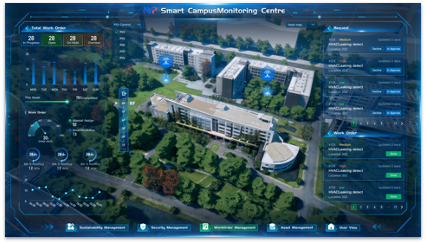
Connect Your BMS to Your CMMS
BMS Alert
Auto work order created
The Problem
Your BMS alerts go nowhere
Building Management Systems generate thousands of alerts. Without CMMS integration, most get ignored.
Without Integration
BMS alerts pile up with no action taken
Technicians manually check BMS dashboards
No record of which alerts led to work orders
Critical equipment issues missed overnight
With Infodeck + BMS
Auto work orders - created from BMS alerts with full context
Smart routing - assigns the right technician based on skills and location
Complete audit trail - linking BMS events to maintenance actions
24/7 monitoring - with automated responses even when nobody is watching
How It Works
BMS meets
CMMS
Two systems, one connected workflow. Your BMS monitors the building; Infodeck manages the response.
Your BMS
Monitors & Detects
- Temperature anomalies
- Equipment faults
- Energy consumption spikes
- Sensor threshold breaches
Auto-syncs via API
Infodeck CMMS
Responds & Tracks
- Creates work orders
- Assigns technicians
- Tracks resolution time
- Reports on performance
Compatible Systems
Works with your existing BMS
Infodeck integrates with major building management platforms through standard protocols.
Honeywell
Niagara / EBI
Full integration via BACnet and REST API
Siemens
Desigo CC
BACnet integration with alarm forwarding
Johnson Controls
Metasys
REST API and BACnet support
Schneider Electric
EcoStruxure
MQTT and REST API integration
Tridium
Niagara 4
Native BACnet/IP integration
Other BMS?
We support BACnet, Modbus, MQTT, and REST API. Contact us for custom integrations.
Talk to our teamIntegration Flow
Set up in 4 simple steps
Get your BMS connected to Infodeck in days, not months.
Connect your BMS
Link your building management system via BACnet, MQTT, or REST API.
Map alert rules
Define which BMS alerts should create work orders and set priority levels.
Configure routing
Set up auto-assignment rules so the right technician gets notified.
Go live
Start receiving automated work orders from your BMS alerts.
Real Scenarios
From alert to resolution
See how BMS integration transforms your maintenance workflow.
HVAC Failure
AHU supply air temp exceeds 28C
Temperature alarm triggered
High-priority WO created, HVAC tech assigned
Chiller Alert
Chiller condenser pressure abnormal
Equipment fault alarm
Emergency WO with 2-hour SLA created
Energy Spike
Floor power consumption 40% above baseline
Energy threshold exceeded
Investigation WO assigned to electrical team
Technical Details
Multiple ways to connect
Choose the integration method that fits your infrastructure.
REST API
HTTP-based integration for modern BMS platforms with webhook support.
BACnet/IP
Industry-standard building automation protocol for direct device communication.
MQTT
Lightweight messaging protocol ideal for IoT and real-time data streaming.
Modbus TCP
Legacy protocol support for older building automation systems.
The Impact
BMS integration results
What teams report after connecting BMS to Infodeck.
Faster
Response to BMS alerts
Fewer
Missed critical alarms
More
BMS alerts actioned
Less
Equipment downtime
BMS Integration Questions
Common questions about connecting your BMS to Infodeck.
Still have questions?
Get Started
Ready to connect your BMS?
Stop missing critical building alerts. Connect your BMS to Infodeck and automate your maintenance response.
30-minute working session. Trial access starts through the demo flow.