
01
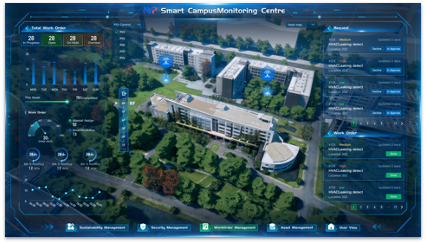
Capture the request and context.
Teams can collect the issue, location, asset, priority, photos, and requester details before work starts.
Give technicians the work details on their phones.
Your field team should not be playing phone tag or deciphering WhatsApp messages. Infodeck's mobile app puts the work order, asset history, photos, and status updates in their pocket.
Operating record
Infodeck keeps the request, assignment, status, evidence, and reporting connected from first report to close-out.
01
Teams can collect the issue, location, asset, priority, photos, and requester details before work starts.
02
Requests, approvals, technicians, contractors, due dates, and follow-up actions stay visible to the people responsible.
03
Close-out notes, timestamps, attachments, and history stay with the record for reviews, audits, and planning.
See what changes when your field team has the right mobile tools
Without Infodeck
The daily struggle
Work orders via paper or WhatsApp
Critical details get lost. Technicians waste time deciphering handwritten notes or scrolling through chat history.
No visibility of technician location
When emergencies hit, you have no idea who's closest. Assignments are guesswork.
Delayed status updates
You only know a job is done when the tech walks back to the office. Customers wait in the dark.
No photo documentation
Before/after proof? Equipment serial numbers? All lost or forgotten. Disputes become he-said-she-said.
With Infodeck
The new reality
Real-time work orders on every phone
New jobs appear instantly. Full details, history, and instructions, all in the technician's pocket.
GPS-based smart assignment
System knows who's available and closest. Emergencies get to the right tech in seconds.
Live status with push notifications
Started. In-progress. Completed. Everyone sees updates the moment they happen.
Built-in photo capture
Snap before/after photos. Scan asset QR codes. Documentation happens automatically.
Every feature designed for field conditions: one hand, bright sun, spotty signal
Purpose-built mobile apps (not a responsive website). Works smoothly even on older devices. Optimized for one-handed use in the field.
Dead zones? No problem. Complete work orders offline, and everything syncs automatically when connectivity returns.
Urgent work can notify the assigned technician directly, even when the app is not already open.
Automatic arrival detection. Accurate labor hours. Route optimization data for smarter scheduling.
Walk through a mobile work order from assignment to closure.
30-minute working session. Trial access starts through the demo flow. Mobile apps included.
Related paths
Follow the next pages that usually help teams evaluate this workflow.