
Smart Sensors and CMMS Integration: Signal to Verified Work
Connect smart sensors to CMMS workflows using clear rules, accountable work orders, verification, and practical network and security checks.

Start here
The short version
Short answer: Connect smart sensors to CMMS workflows using clear rules, accountable work orders, verification, and practical network and security checks.
What to check as you read
- There is no universal sensor list. Start with a defined failure mode or operating question and the action a facility team can take.
- A useful integration follows signal, rule, accountable work, and verification instead of stopping at an alert dashboard.
- Thresholds need units, context, dwell time, reset behavior, ownership, and a recorded source.
- Coverage, battery life, accuracy, and reporting intervals depend on the device, building, network design, and use case; verify them on site.
A smart sensor becomes useful to maintenance when its signal can trigger a clear rule, reach an accountable person, and leave evidence that the condition was checked. The CMMS should own the work record. Building controls and edge systems should continue to own approved local control and time-sensitive processing.
There is no set of sensors that every facility must install. A cold room, lift motor, restroom, roof tank, lecture hall, and office floor have different failure modes, environments, response teams, and evidence needs. Start with the operational problem, then choose the measurement.
Select a sensor from the work it should create
Use this matrix as a starting point, not a universal priority list.
| Operating question | Possible measurement | Work the event may create | Useful verification |
|---|---|---|---|
| Is water present where it should not be? | Point moisture, sensing cable, or flow anomaly | Inspect source, protect affected equipment, repair leak | Area dry, source corrected, sensor reset and tested |
| Is a space or asset outside its approved environmental range? | Temperature, humidity, dew point, or equipment surface temperature | Inspect controls, airflow, enclosure, refrigeration, or sensor condition | Manual check and stable reading within the approved range |
| Is ventilation or air quality performance drifting? | Carbon dioxide, particulate matter, temperature, humidity, or other approved parameters | Check occupancy context, ventilation operation, filtration, and sensor placement | Control response checked and sustained condition resolved |
| Is actual use different from the operating plan? | Binary occupancy, people count, door state, or booking event | Review cleaning, comfort, room, or scheduling exceptions | Task completed and policy or schedule change documented |
| Is rotating or electrical equipment departing from baseline? | Vibration, current, power, temperature, pressure, or run state | Inspect the asset and confirm the cause before repair | Post-work measurement compared with the site baseline |
| Did equipment enter a state that needs attention? | Dry contact, controller alarm, fault code, or runtime counter | Route inspection or condition-based maintenance | State cleared, local controls tested, cause recorded |
The EPA’s WaterSense guidance for commercial and institutional facilities includes leak detection and repair practices. The U.S. Department of Energy’s wireless occupancy sensor guide explains how occupancy sensing can support lighting controls. Neither source says that one sensor type, network, or payback applies to every facility.
Build the signal-to-verification chain
1. Signal: identify the measurement
For each sensor point, record:
- device and point identifier
- linked asset, room, zone, or system
- measurement name and unit
- expected reporting interval
- valid operating and sensor ranges
- event time, receipt time, and time zone
- data-quality or device-health state
- calibration or functional-test requirement
- owner and support contact
Use stable identifiers instead of display names alone. A label such as Plant Temp becomes ambiguous when devices move or similar equipment is added.
The sensor also needs a known failure state. A missing value, stale timestamp, flat line, implausible jump, or silent device should not be treated as a healthy reading. Define how long a point can be silent before someone investigates it, based on the use case rather than a global interval.
2. Rule: decide when data becomes an event
A threshold without context creates noise. Write the rule so another operator can explain it:
- condition, unit, and comparison method
- dwell time or repeated-reading requirement
- deadband or hysteresis around the threshold
- equipment state, load, occupied hours, or seasonal context
- invalid-data handling
- suppression during planned maintenance
- duplicate and repeat-event behavior
- severity, owner, escalation, and after-hours route
- reset condition and closure evidence
- rule source, approver, version, and effective date
For example, a single warm reading during a defrost cycle may be normal, while the same reading sustained after the cycle may require investigation. A vibration exception while equipment is starting may mean something different from the same value at steady load.
Thresholds should come from equipment guidance, an approved control sequence, an engineering assessment, or a measured site baseline. A copied internet value is not a rule source.
3. Accountable work: create only the task a person can complete
Not every alert should create a work order. Some readings should remain in trend data. Some should prompt a local control response. A CMMS event should create work when a named person must inspect, decide, repair, clean, test, or document a condition.
The work order should include the linked asset record, event time, current value, unit, rule, data-quality state, priority, response instructions, and diagnostic evidence. Keep repeated readings associated with one open incident unless the response policy requires separate work.
Do not let a sensor assign authority it does not have. A moisture event can request inspection; it does not authorize an unreviewed valve operation. A vibration exception can prompt a mechanical check; it does not prove a bearing failure. An indoor air quality reading can prompt investigation; it does not by itself prove compliance or non-compliance.
4. Verification: prove what happened after the alert
Close the loop with evidence appropriate to the condition:
- technician diagnosis and action
- photo or documented observation where useful
- manual measurement from an approved instrument
- local controller or alarm test
- post-work sensor reading held for an approved period
- parts, configuration, or calibration change
- classification as valid, false, duplicate, device fault, or unresolved
If the sensor remains outside range, the work should not silently close as resolved. Escalate it, keep it open, or record an approved exception with an owner and review date.
Match sensor types to real facility conditions
Leak and moisture monitoring
Place leak sensors from a site risk assessment, not a generic count per floor. Consider water sources, vulnerable equipment, drainage, access, and the route a technician can take after an alarm. Point sensors and sensing cables detect different patterns. Flow data may identify another class of anomaly.
Define whether a local alarm or shut-off is part of the approved building controls design. The maintenance record should retain the event, location, affected asset, response, cause, repair, and dry-state verification. The smart water leak detection guide covers that workflow in more detail.
Temperature and humidity monitoring
Specify the measurement range, accuracy, response time, enclosure, placement, and calibration need for the actual environment. A wall sensor for comfort monitoring is not automatically suitable for a cold room, electrical enclosure, pipe surface, or bearing.
Use separate rules for equipment protection, environmental control, and occupant comfort. Each may have a different source, priority, and response. A sensor close to a supply diffuser or heat source may report accurately at the wrong location.
Indoor air quality monitoring
Choose parameters from the operating question and applicable requirements. ASHRAE Standard 62.1 addresses ventilation and acceptable indoor air quality for non-residential buildings. A carbon dioxide or particulate reading can support investigation, but one sensor does not demonstrate that the whole building complies with the standard.
Record placement, ventilation zone, occupancy context, outdoor conditions where relevant, device limitations, and the control response. Persistent exceptions may create work for dampers, fans, filters, schedules, or sensor checks. The HVAC and indoor air quality maintenance guide provides a focused operating pattern.
Occupancy and use monitoring
Binary presence, people counts, booking data, and door events answer different questions. Choose the least intrusive measurement that supports the defined task. A cleaning route may need room-use counts, not identities. A comfort rule may need occupied or unoccupied state, not continuous movement history.
Document purpose, access, retention, aggregation, and deletion before collecting data that may relate to people or location. Test false vacancy in spaces where occupants sit still and false presence caused by movement outside the intended zone.
Vibration, electrical, energy, and equipment-state monitoring
These measurements need equipment context. Record operating state, load, speed, process condition, sensor mounting, sampling method, and baseline. High-frequency vibration or waveform data may be processed locally so the CMMS receives a qualified event and a retained diagnostic reference rather than every raw sample.
An anomaly is a reason to inspect. It is not a diagnosis. Technicians still need to consider alignment, mounting, lubrication, load, controls, process changes, electrical condition, and the sensor itself. For the full maintenance method, use the condition-based maintenance guide.

Choose connectivity without fixed range or battery promises
Network choice follows the use case. The right answer may differ within the same building.
| Connection | Often useful for | Questions to test |
|---|---|---|
| BACnet or Modbus over an existing controls network | Powered building equipment and controller points | Who owns the point, polling, write access, naming, and controls change process? |
| Ethernet or Wi-Fi | Powered devices with higher data or update needs | Is coverage available at the equipment, and how is the device separated, authenticated, and updated? |
| LoRaWAN | Low-data-rate devices where wiring or continuous power is difficult | Do actual installation points reach approved gateways, and do payload, interval, downlink, and battery needs fit? |
| Cellular | Remote or distributed assets independent of site networks | Are coverage, subscription, roaming, data use, support, and lifecycle costs acceptable? |
| Vendor gateway or private radio | Specialist equipment or existing estates | Is the protocol documented, can data be exported, and what happens if the vendor or product is retired? |
The LoRaWAN L2 specification describes a network protocol optimized for battery-powered end devices. It does not guarantee a fixed indoor range, battery life, device count, or message delay. Those depend on device design, payload, reporting interval, radio settings, gateways, building materials, interference, firmware, and regional parameters.
Test each proposed location with the selected device and installation method. Include doors closed, plant operating, cabinets in their normal state, and any expected seasonal or occupancy condition. Record failed points as design input, not as installation surprises.

Define the data contract before integration
A stable event contract prevents each vendor payload from becoming a separate maintenance workflow.
| Required field | Why the CMMS needs it |
|---|---|
| Device ID and point ID | Identifies the source and supports replacement history |
| Asset ID and location ID | Routes work to the right equipment and site |
| Event and receipt timestamps | Exposes delivery delay and preserves the measured sequence |
| Value, unit, and quality | Prevents unit errors and marks suspect data |
| Rule ID and version | Explains why work was created |
| Event or correlation ID | Supports retries and deduplication |
| Severity and owner | Applies the approved response route |
| Diagnostic reference | Points to retained raw or local evidence when needed |
| Device, gateway, and software state | Helps support teams investigate the data path |
MQTT 5.0 is an OASIS publish-and-subscribe messaging standard used in constrained IoT environments. HTTPS APIs are another common integration method. Neither protocol defines the maintenance rule or guarantees that a work order will be created exactly once. Design retries, acknowledgements, deduplication, and error handling across the full path.
Treat sensors and gateways as maintained assets
Connected devices create their own maintenance work. Keep a device register with:
- model, serial number, firmware, and installation date
- linked asset and exact physical location
- network, gateway, and credential owner
- measurement range and stated accuracy
- calibration, functional-test, cleaning, and battery requirements
- last contact and health state
- support contact and known support end where supplied
- replacement, reassignment, and retirement history
NIST’s IoT cybersecurity baseline identifies device identification, configuration, data protection, interface access, software update, and cybersecurity state awareness as core areas. Ask how each device supports those needs before procurement, not after installation.
Also test the device-failure workflow. A silent sensor should create a different event from a healthy process value. Replacing it should preserve the linked asset and historical maintenance record without pretending the new device is the old one.
Pilot one complete response workflow
Start with one problem and a limited asset group. The pilot is complete only when the team has tested the full operating path.
Before installation
- Name the failure mode or decision.
- Define the local control boundary and the work a person will perform.
- Record the baseline and rule source.
- Survey device location, power, network, access, and environment.
- Approve security, privacy, retention, and support ownership.
- Define acceptance criteria and closure evidence.
During commissioning
Test normal events, bad values, stale readings, duplicate messages, missing data, time errors, gateway loss, network recovery, rule changes, planned suppression, and device replacement. Confirm that operators can see why an event became work and who changed the rule.
During the operating trial
Measure:
- events delivered to the correct asset and owner
- missed, duplicate, stale, and false events
- work orders created unnecessarily
- open events without an accountable response
- acknowledgement and closure by priority
- completed work with the required verification
- device, gateway, and integration availability
- technician and administrator effort
- the site-specific outcome the pilot was designed to improve
Calculate value from observed results. Include devices, network, integration, software, commissioning, calibration, replacement, support, and staff time. Avoid turning one avoided incident or short seasonal trial into a universal savings claim.
Connect sensor evidence to the same operating record
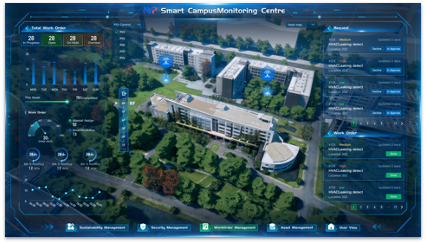
Infodeck IoT monitoring is designed to connect sensor events with asset and work context. The boundary still matters: building controls handle approved control actions; the maintenance record handles ownership, investigation, and proof.
Use the edge computing for facility management guide when deciding what to process locally. Review pricing for platform scope, then book a demo with one real signal, rule, response route, and verification requirement to test.
The useful sensor is not the one with the longest specification sheet. It is the one your team can maintain, trust, act on, and verify in the conditions where it is installed.
Sources and references
- EPA WaterSense Best Management Practices for Commercial and Institutional Facilities
- U.S. Department of Energy Wireless Occupancy Sensors for Lighting Controls
- ASHRAE Standards 62.1 and 62.2
- NISTIR 8259 Series: IoT Cybersecurity Guidance
- NIST SP 800-82 Revision 3: Guide to Operational Technology Security
- OASIS MQTT Version 5.0
- LoRa Alliance LoRaWAN L2 1.0.4 Specification
- ASHRAE Standard 135 BACnet Resources
Frequently Asked Questions
Which smart sensors should a facility connect to a CMMS?
How do smart sensors connect to CMMS software?
Should every sensor alert create a work order?
Is LoRaWAN always the best network for facility sensors?
How can a CMMS verify that sensor-triggered work solved the issue?
How should facilities teams calculate sensor ROI?
From guide to workflow
See where this work lives in Infodeck
When the idea becomes daily work, Infodeck keeps requests, owners, updates, and proof on one operating record.
IoT and sensor response
Route sensor events into alerts, work orders, and follow-up.
View IoTWork order management
Turn requests into assigned work, SLA tracking, updates, and closure proof.
View work ordersPlatform overview
Requests, assets, rooms, visitors, contractors, sensors, and approvals on one operating record.
Explore platform

